





Jump to content
View in the app

A better way to browse. Learn more.

KH13 · for Kingdom Hearts

A full-screen app on your home screen with push notifications, badges and more.

To install this app on iOS and iPadOS
  1. Tap the Share icon in Safari
  2. Scroll the menu and tap Add to Home Screen.
  3. Tap Add in the top-right corner.
To install this app on Android
  1. Tap the 3-dot menu (⋮) in the top-right corner of the browser.
  2. Tap Add to Home screen or Install app.
  3. Confirm by tapping Install.

Official Kingdom Hearts T-shirt design revealed

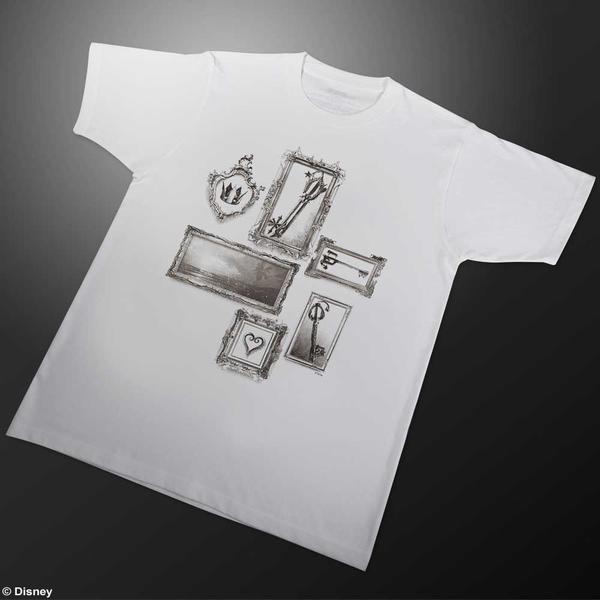
Square Enix's merchandise manager, Hidemi Matsuzuka has revealed the design for an official Kingdom Hearts themed T-shirt. The design features iconic Kingdom Hearts symbols including a heart, crown and various Keyblades. Once we have a release date we'll let you know. You can view a picture of this below.


B2Y00puCEAAMSpe


Update: Square Enix has announced that they will be selling it at their Café, Artnia tomorrow. We also now have better photos of the T-shirt which you can view below.
 

B295RNICcAEglVi

B295RLZCQAElmxl

User Feedback

Recommended Comments

HeyMouseSayCheese

Verified Member
(edited)

God, I hope it comes in fat American big & tall sizes. I would never wear anything else.

Edited by HeyMouseSayCheese

BlankShell

Verified Member

Hey, I keep meaning to go back to Japan. I'd buy it in a heartbeat.

Sora96

Verified Member

I don't like it, so no.


What don't you like about it?

rikulover35

Verified Member

i need it Q_Q and i would be happy for days 

Joker

Verified Member

heres whered id post a meme about spongebob  saying I NEED IT I NEED IIIIIIT!!!!!!  but im to lazy

Drones

Verified Member

Looks like they weren't even trying.

King_Graham

Verified Member

Square, plz Shut up and take my munny.

King_Graham

Verified Member

Looks like they weren't even trying.

The frames actually look pretty nice.

Dr_Venesto

Verified Member

i would definitely buy it!!

Silent

Verified Member

Erm this looks awful. I feel like each frame should be on a separate shirt or something.

Join the conversation

You can post now and register later. If you have an account, sign in now to post with your account.

Guest
Add a comment...

Configure browser push notifications

Chrome (Android)
  1. Tap the lock icon next to the address bar.
  2. Tap Permissions → Notifications.
  3. Adjust your preference.
Chrome (Desktop)
  1. Click the padlock icon in the address bar.
  2. Select Site settings.
  3. Find Notifications and adjust your preference.
Scroll to the top
